


DJI Osmo Pocket 3
Next-Level Imaging Starts Here
- 1-Inch CMOS & 4K/120fps
- 2-Inch Rotatable Screen & Smart Horizontal-Vertical Shooting
- 3-Axis Gimbal Mechanical Stabilization
- ActiveTrack 6.0
- Full-Pixel Fast Focusing
- D-Log M & 10-Bit
- Stereo Recording
- Pocket-Sized Vlogging Camera
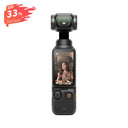
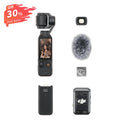

Delivers in 3–4 days

24/7 Customer Care

30-Day Easy Returns

1 Years Factory Warranty
1″ Large CMOS Pocket Gimbal Camera
OSMO Pocket 3
Time in Your Hands
Motionlapse - Time in Motion
Panorama-Bring Every Scene to Life
180° SpinShot with One Hand
10-Bit HLG HDR: High-Range Video Made Easy
4x Digital Zoom Capability
Compact Body, Big Visual Impact

Powerful 1-Inch Sensor
Capture every detail with Pocket 3’s powerful 1-Inch CMOS sensor. Superior optics and enhanced low-light performance take your images to the next level.

DJI OsmoAudio™: High-Quality Audio via Direct Connection
Pocket 3 Directly Connects to Two DJI Mic 2/Mic Mini Transmitters for Dual-Person Audio, Delivering Ultra-Clear Sound for Vlogs, Interviews, and Livestreams.

Pocket 3: Livestream
With Pocket 3, you can livestream in high definition, ensuring smooth, professional-quality video for any occasion.

Pocket-Sized for Big Adventures
Pocket 3 is compact and flexible, slipping easily into your hand or pocket so you’re always ready to record life’s best moments.

Creative Freedom with Vibrant Options
The 2-inch rotatable touchscreen enables easy horizontal or vertical shooting. ActiveTrack 6.0 delivers smooth, cinematic footage, while stereo recording and dual DJI Mic 2 support ensure crystal-clear sound.

Shoot Fast, Stay Steady, Hit Every Moment
From family moments to pet adventures, Pocket 3’s full-pixel fast focus and three-axis gimbal keep every shot sharp and stable, all in a compact, pocket-sized design.
2-Inch Rotatable Screen: Fun in Every Shot
With a 2-inch full-color OLED touchscreen, Pocket 3 delivers vibrant visuals and effortless control. Rotate to start shooting or tap to adjust settings.
Keep Every Moment in Focus
Pocket 3’s full-pixel fast focus keeps even the fastest-moving subjects sharp with ease. The new Product Showcase mode prioritizes the foreground for quick, smooth focus—ideal for livestreams and product demos.
Capture Every Color in 10-Bit D-Log M
The 10-bit D-Log M records up to a billion colors with ultra-high dynamic range, delivering natural, detailed color in any scene and offering greater flexibility in post-production.
Stereo Sound Capture
Pocket 3 features a built-in three-mic array that reduces wind noise and captures true omnidirectional stereo sound. Even in noisy environments, it precisely identifies sound sources for immersive audio. USB Audio support allows quick connection to external mics and monitoring headphones.
Fast-Charging Power & Secure Gimbal Storage

Fast Charging, Long-Lasting Power
Pocket 3 charges to 80% in just 16 minutes, providing up to two hours of shooting. Fully charged, it records up to 116 minutes of 4K/60fps or 166 minutes of 1080p/24fps footage, giving you more time to capture the moments you love.
Automatic Axis Locks for Easy Storage
When Pocket 3 powers off, its gimbal automatically locks into a secure stored position, keeping it protected and ready for your next adventure.
What’s in the Box?

Osmo Pocket 3 * 1

Type-C to Type-C PD Cable * 1

Osmo Pocket 3 Protective Cover * 1

Osmo Pocket 3 Handle With 1/4″ Thread * 1

DJI Wrist Strap * 1
FAQs
Compared with DJI Pocket 2, Osmo Pocket 3 delivers significant improvements in imaging performance, shooting experience, and intelligent features:
- Imaging Performance: Upgraded from a 1/1.7-inch sensor to a 1-inch CMOS sensor, enabling high-resolution footage across various scenarios, cleaner low-light performance, improved dynamic range in high-contrast scenes, and support for 4K/120fps recording.
- Shooting Experience: The upgraded 2-inch OLED screen offers richer colors and higher contrast. Both horizontal and vertical shooting are displayed full-screen. You can double-tap the subject to start tracking or rotate the screen to quickly power the device on or off. Built-in Wi-Fi allows direct smartphone connection without the Do-It-All Handle for fast transfer, editing, and sharing.
- Intelligent Features: ActiveTrack has been upgraded to version 6.0, combining mechanical gimbal stabilization with advanced tracking algorithms to keep the subject centered and in focus regardless of grip or movement.
- Face Auto-Detect: Automatically recognizes and smoothly tracks a single subject once they enter the frame—ideal for vlogging.
- Dynamic Framing: Locks the subject in a predefined position without manually moving the device, improving creative efficiency and composition consistency.
Osmo Pocket 3 supports the following accessories to enhance shooting flexibility, battery life, and portability:
- Osmo Pocket 3 Black Mist Filter
- Osmo Pocket 3 Magnetic ND Filters Set
- Osmo Pocket 3 Wide-Angle Lens
- Osmo Pocket 3 Battery Handle
- Osmo Pocket 3 Expansion Adapter
- Osmo Mini Tripod
- Osmo Pocket 3 Carrying Bag
Note: Osmo Pocket 3 does not support exclusive accessories from previous Pocket series models.
Recommended microSD cards include:
- SanDisk Extreme Pro 32GB V30 A1 UHS-I
- Kingston Canvas Go! Plus 64GB / 128GB UHS-I V30
- Kingston Canvas React Plus 64GB / 128GB / 256GB UHS-II V30
- Lexar Professional 256GB / 512GB SDXC UHS-I V30 (1066x)
What parameters can be customized?
- There are three modes: Hyperlapse, Timelapse, and Motionlapse.
- In Hyperlapse mode, you can set the resolution, frame rate, and speed.
- In Timelapse mode, you can set the resolution, frame rate, interval, and duration.
- In Motionlapse mode, you can set the resolution, frame rate, interval, duration, and waypoints.
D-Log M is designed to capture a wide dynamic range from the sensor with evenly distributed colors. It produces a flat, low-contrast image rather than a LUT, preserving highlight and shadow detail and providing greater flexibility for professional color grading in post-production.
Yes. Osmo Pocket 3 supports the following slow-motion recording options:
- 4K/120fps — 4× slow motion
- 1080p/240fps — 8× slow motion
Yes. Osmo Pocket 3 supports livestreaming via YouTube and RTMP platforms.
Open the LightCut app, select One-Tap Edit, and choose the videos you’ve recorded.
LightCut automatically analyzes your footage and recommends templates optimized for scenarios such as:
- Nature
- City
- Home
- Shopping
- Food
- Pets
- Festivals
The app intelligently selects clips and generates a polished short video with no manual editing required.
