


DJI Osmo 360 Standard Combo
Shoot Smarter With Pro-Level Features
- 1-Inch 360° Imaging
- Native 8K 360° Video with Exceptional Low-Light Performance
- 4K/120fps & 170° Boost Video Mode
- 120MP Ultra-High-Resolution 360° Photo
- Osmo Magnetic Quick-Release Ecosystem Compatibility
- 100-Min 8K/30fps Continuous Recording
- 10-bit Color & D-Log M for Professional Grading
- OsmoAudio™ Direct Microphone Connection

Delivers in 3–4 days

24/7 Customer Care

30-Day Easy Returns

1 Years Factory Warranty
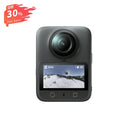
8K Ultra-Flagship Panoramic Camera
Osmo 360
Tiny Body, Big Shots.
Native 8K Panoramic Video
170° Ultra-Wide 4K/120fps
The Perfect Vlogging Companion
120MP Ultra-Detail Panorama
Single-Lens Super Night Mode
Compact & Mighty

Compact 183g Design
Despite housing two large 1-inch panoramic lens modules, the camera weighs only 183g thanks to its stacked compact design.

100-Min 8K/30fps Recording
High-performance imaging chip and advanced cooling enable continuous 8K/30fps recording for 100 minutes. Shoot 6K panoramic video for up to 190 minutes.

105GB Onboard Storage
With 105GB of built-in storage, you can shoot anywhere without worrying about carrying a microSD card.

Immersive Sound
Equipped with four microphones, it captures sound from all directions with stereo depth. Switch between mono and stereo, with advanced wind-noise reduction for clear audio.

High-Speed Transfer
Supports Wi-Fi 6 and USB 3.1, delivering up to 90MB/s wireless and 600MB/s wired transfer speeds for efficient handling of large files.

Protected Battery Compartment
The battery compartment features a left-right sliding unlock button to prevent accidental opening and battery ejection, ensuring safe operation during active shooting.
Ultra Panoramic, Reimagined
10-Bit Color & D-Log M
Captures over a billion colors with 10-bit depth. D-Log M enhances dynamic range and preserves rich highlight and shadow details for flexible color grading.
Invisible Selfie Stick
When shooting panoramic video with the Invisible Selfie Stick, it automatically disappears from the frame—unlocking effortless third-person views as if a camera operator is following you.
Selfie Mode
Export wide-angle footage with the Invisible Selfie Stick effect in 4K/60fps, 3K/120fps, or 2K/240fps. Capture smooth selfies or high-energy slow-motion moments with ease.
Freeze Every Detail in 360°
Shoot up to 120MP/16K ultra-high-resolution 360° photos with crisp detail and expansive clarity—bringing the real world to life like never before.
Waterproof and Cold-Resistant. Ready for Anything.

IP68 Waterproof
Dive up to 10 meters with IP68 waterproof protection, no housing needed.

Cold-Resistant Performance
Works smoothly in -20°C conditions with continuous shooting for more than 1.5 hours.
What’s in the Box?

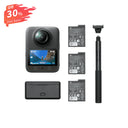
Osmo 360*1

Osmo Action Extreme Battery Plus (1950 mAh)*1

USB-C to USB-C PD Cable (USB 3.1)*1

Osmo Lens Cleaning Cloth*1

Osmo 360 Rubber Lens Protector*1

Osmo 360 Camera Protective Pouch*1
FAQs
- New-generation 1/1.1-inch square CMOS sensor for panoramic coverage equivalent to a 1-inch sensor.
- High-brightness OLED touchscreen for clearer display and easier operation.
- Wi-Fi 6.0 and USB 3.1 for fast data transfer.
- 128GB built-in storage (105GB available), expandable via microSD card.
- Battery life: up to 100 minutes for 8K/30fps panoramic video.
- Battery life: up to 190 minutes for 6K/24fps panoramic video.
- Battery life measured under controlled lab conditions; actual performance may vary.
- The dual fisheye lenses of Osmo 360 feature multi-layer coatings and hardened surface treatments, delivering exceptional image quality while improving resistance to scratches and minor abrasions encountered in everyday use. However, as camera lenses are high-precision optical components, careful handling is always recommended.
- When storing the camera, use the Rubber Lens Protector or place Osmo 360 in a protective pouch to prevent the lenses from coming into contact with hard objects such as keys or sand. Before storage, ensure the protector or pouch is free of foreign particles to avoid accidental scratching.
- Before shooting, remove the Rubber Lens Protector or pouch and gently clean the lens surfaces to eliminate fingerprints, oil, or smudges that could affect image quality.
- For shooting in demanding environments where the lenses may be exposed to impacts, we recommend using the Osmo 360 Transparent Lens Protectors* for enhanced protection. * Osmo 360 Transparent Lens Protectors are sold separately.
Panoramic Video:
- 8K: 7680 × 3840 @ 24/25/30/48/50fps
- 6K: 6000 × 3000 @ 24/25/30/48/50/60fps
- 4K: 3840 × 1920 @ 100fps
Single Lens – Video:
- 5K (4:3): 5120 × 3840 @ 25/30fps
- 5K (16:9): 5120 × 2880 @ 25/30/50/60fps
- 4K (4:3): 3840 × 2880 @ 25/30/50/60fps
- 4K (16:9): 3840 × 2160 @ 25/30/50/60fps
- 2.7K (4:3): 2688 × 2016 @ 25/30/50/60fps
- 2.7K (16:9): 2688 × 1512 @ 25/30/50/60fps
Ultra Wide-Angle Video:
- 4K (4:3): 3840 × 2880 @ 25/30/50/60/100/120fps
- 4K (16:9): 3840 × 2160 @ 25/30/50/60/100/120fps
- 2.7K (4:3): 2688 × 2016 @ 25/30/50/60/100/120fps
- 2.7K (16:9): 2688 × 1512 @ 25/30/50/60/100/120fps
SuperNight Mode:
- 8K: 7680 × 3840 @ 24/25/30fps
- 6K: 6000 × 3000 @ 24/25/30fps
- Dual fisheye lenses + stitching algorithm remove the selfie stick in photos/videos.
- Use official DJI Invisible Selfie Stick (sold separately) and align it straight with the camera.
- Misalignment or angled mounting may prevent the effect.
- Panoramic videos: OSV
- Flat videos: MP4 (HEVC)
- Panoramic Video: up to 4K/100fps 4× slow-motion
- Single-Lens Video: up to 4K/120fps 4× slow-motion
- Via DJI Mimo App: download content from microSD or built-in storage to smartphone.
- Using card reader: export from microSD card to computer or smartphone.
- USB-C connection: swipe down → Settings → USB Mode → connect to computer or smartphone.
